
Generate your Australia Post or StarTrack API key and connect it with Starshipit to automate checkout options and label generation. This guide explains how to create your API key using your existing Australia Post account.
Before you begin
- Your Australia Post (eParcel) or StarTrack account number.
- An active Australia Post Business Credit Account and an eParcel Contract. If you don’t have an account, visit Australia Post’s website to register your interest. Mention that you’re using Starshipit.
- Alternatively, if you don’t have one of these accounts, sign up with MyPost Business.
Create your API key
To create your API key, you must sign in with the same Australia Post account that is linked to your eParcel or StarTrack account.
If you sign in with a different Australia Post account (one that does not match your account number), you’ll be prompted to log in again with the correct one.
-
Go to the Australia Post Developer Centre.
-
Log in using your existing Australia Post account credentials.
-
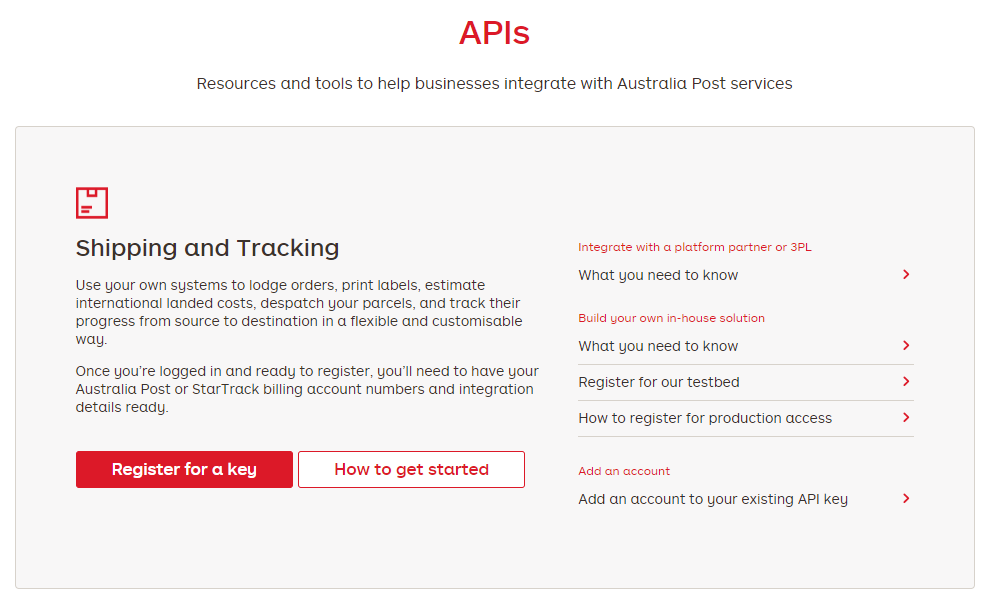
Select Register for a key under Shipping & Tracking.
-
Complete the registration form using your Australia Post, StarTrack, or Same Day/On Demand account details.
-
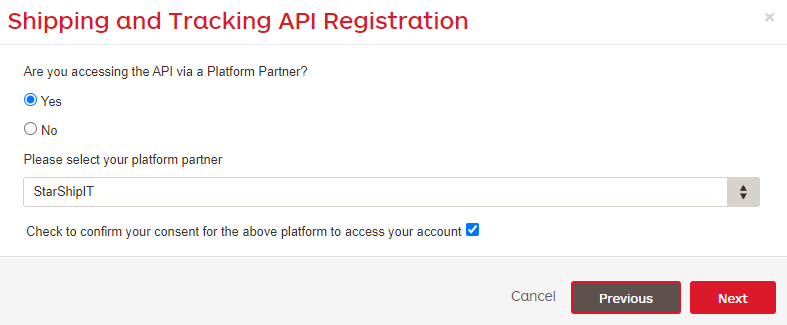
When asked if you’re accessing the API via a Platform Partner, select Yes and choose Starshipit.
-
Click Next and follow the remaining prompts to complete registration.
Once your registration is approved, Australia Post will email you a PDF containing your API credentials - usually within 24 hours. Follow the instructions in the email or PDF to generate your API key.
If you haven’t received the email within 24 hours, check your junk or spam folder. You can also contactcustomer_connectivity@auspost.com.auor your e Parcel Account Manager for assistance.
Add eParcel to your account
- You can add eParcel yourself by following this guide.
- If you need help, contact our support team here with your account number, API key and secret.
Troubleshooting / FAQs
Why am I being asked to log in again?
You’re logged in with a different Australia Post account than the one linked to your account number. Log out and log in again with the correct account.
I didn’t receive my API key email.
Check your junk/spam folder or contact customer_connectivity@auspost.com.au. Approval usually takes up to 24 hours.
Who should I contact for technical issues?
Reach out to the Australia Post Service Desk at customer_connectivity@auspost.com.au or call 03 9106 7232 / 02 8755 9417.