# How to set up Quantium Solutions
URL: https://support.starshipit.com/articles/360000313215-how-to-set-up-quantium-solutions
Canonical: https://support.starshipit.com/articles/360000313215-how-to-set-up-quantium-solutions
Markdown: https://support.starshipit.com/articles/360000313215-how-to-set-up-quantium-solutions.md
Updated: 2026-05-06
> For the complete documentation index, see [llms.txt](https://support.starshipit.com/llms.txt).
> Step-by-step guide to setting up Quantium Solutions.
* Quantium Solutions’ [integration with Starshipit](https://starshipit.com/partner/quantium-solutions-3pl) allows you to use all of [Starshipit's features](https://www.starshipit.com/features) including generation of packing slips and shipping labels, auto-correction of addresses, branded tracking and notifications and many more.
* This article outlines how to set up Quantium Solutions in Starshipit.
## Set up Quantium Solutions
### 1. Request your Quantium Solutions API information
To add Quantium Solutions to your Starshipit account, you first need to request your API information from [Quantium Solutions](mailto:kiat.chun@quantiumsolutions.com).
You will receive the following details:
| | |
| --- | --- |
| Account No | 999999 |
| Username | 999999 |
| Password | Password |
| API Cust ID | 108 |
| Encryption Key | NzQ3M234567yMDk0MzI3Y2Ri99999l0863836vyY2YzNzI1OTQxMw |
| API URL (Prod) | |
| API WSDL (Prod) | |
| Quantium Service | International Standard and International Premium |
### 2. Set up Quantium Solutions in Starshipit
1. In Starshipit, navigate to **Settings** > **Couriers** > **Add a new courier** > **Quantium Solutions**.
2. Enter your Username, Password, API Cust ID and Encryption Key.
3. Enter your product codes (refer to the product code list below).
4. Click **Save**.
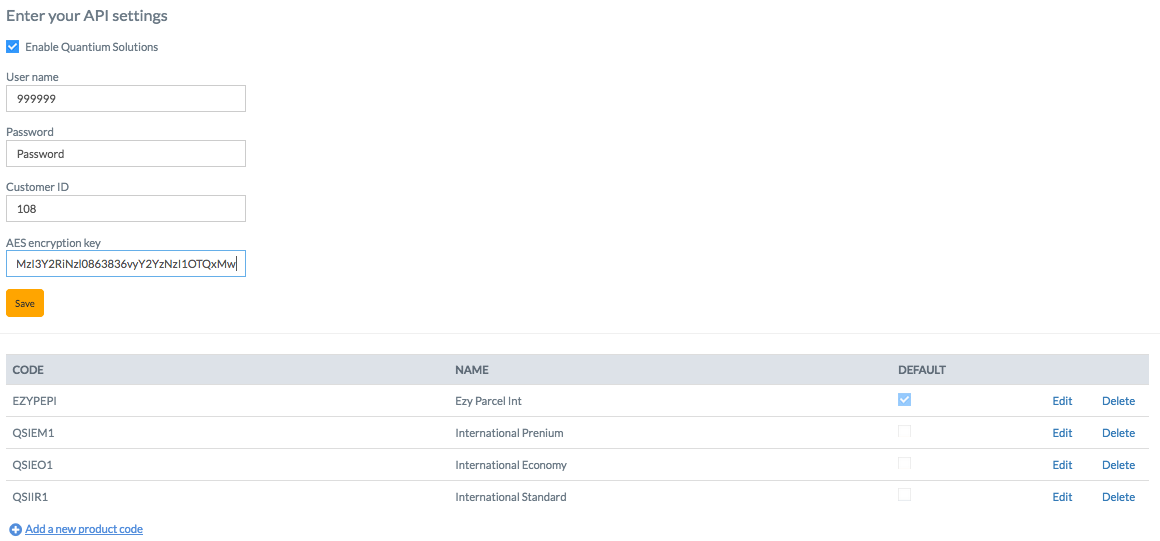
### 3. Quantium Solutions product codes
These are the product codes and names - if you have a product code that is not on the list please contact our [support team](https://help.starshipit.com).
1. International Economy (QSIE01)
2. International Standard (QSIIR1)
3. International Premium (QSIEM1)
4. International ePAC (EZYPEPI)
:::note
Quantium Solutions doesn't pass rates into Starshipit, so they are not displayed in the New Order page. You can set up table rates for Quantium Solutions though, where you record the rates that the courier charges you, and these are then available via the Starshipit API.
:::
### Other relevant information for you
Learn more about automated packing machine rolled out by Quantium solutions [here](https://www.starshipit.com/blog-content/2019/12/11/future-of-ecommerce-delivery-with-starshipit-quantium-solutions?rq=quantium%20solutions).