
Use Starshipit to send shipment transit status updates (such as "Out for delivery" and "Delivered") back to Shopify. When combined with Shopify's own shipping notification emails, this lets you keep customers updated at each key stage of delivery. This guide explains how the Starshipit setting works, when to enable it, and how to configure Shopify notifications.
How transit status writeback works with Shopify
By default, when you use Starshipit with Shopify, Starshipit writes back tracking details and updates the Shopify order to Shipped once the label is created or the order is fulfilled.
There is an optional Starshipit setting that also writes back additional transit statuses to Shopify.
When this setting is enabled in Starshipit, and you have the matching notification emails turned on in Shopify, Shopify can send extra shipping updates to your customers using its own email templates.
If this setting is not enabled in Starshipit, the order still updates to Shipped, but there is no additional status writeback.
Enable transit status writeback in Starshipit
- Go to Settings > Integrations.
- Click into your Shopify integration settings.
- Under the Writeback section, tick the checkbox for Enable fulfillment event writeback.
- Click Save.
Configure shipping notifications in Shopify
After you enable fulfillment event writeback in Starshipit, you also need to configure which shipping emails Shopify sends.
To enable shipping status notifications in Shopify:
- Log into your Shopify admin.
- Click Settings in the left navigation menu.
- Select Notifications.
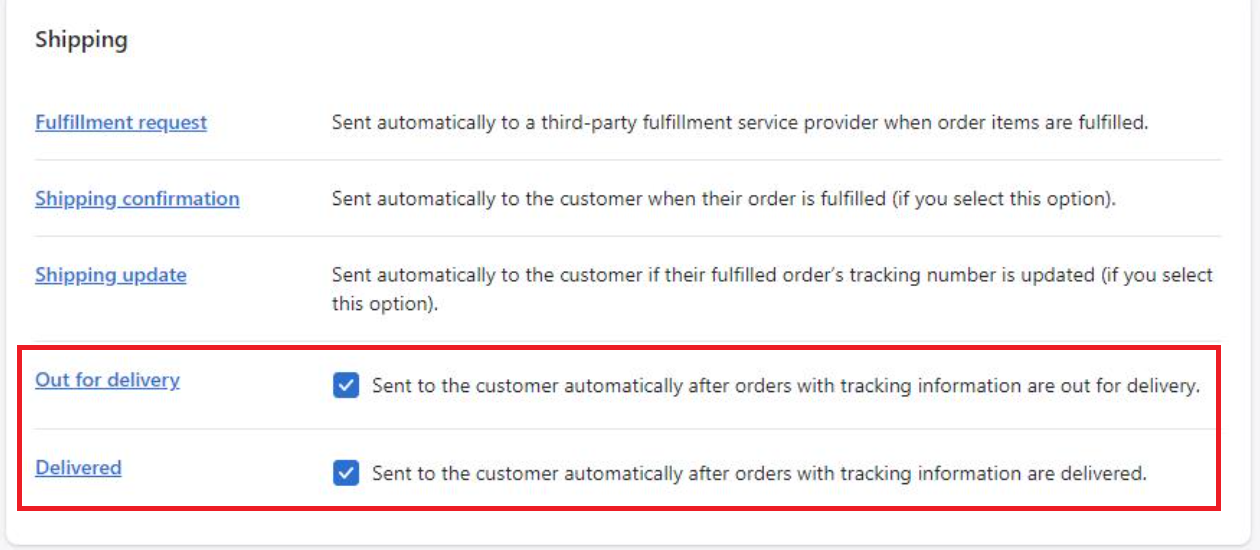
- Scroll down to the Shipping section.
- Selec the transit status notifications you'd like Shopify to send, such as:
- Out for delivery
- Delivered
When to use this setting
Most Starshipit users only send a single “your order has shipped” email to customers, either from Starshipit or from Shopify. In this case, you usually do not need the extra transit status writeback.
Enable the transit status writeback setting in Starshipit when:
- You want customers to receive additional updates, such as Out for delivery and Delivered, from Shopify.
- You already use (or plan to use) Shopify’s own shipping notification emails for these statuses.
- You prefer to keep all customer-facing shipping emails consistent and managed from Shopify.
If you only want Starshipit to send emails (and do not use Shopify shipping status emails), you can leave this setting turned off.
Troubleshooting / FAQs
Do I need to enable this setting for Starshipit tracking emails to work?
No. Starshipit tracking emails do not depend on the Shopify transit status writeback setting. This setting only affects what statuses Starshipit sends back to Shopify.
What happens if I leave the setting turned off?
Starshipit will still:
- Writeback tracking details to Shopify.
- Update orders in Shopify to Shipped.
You just will not see additional transit statuses such as Out for delivery and Delivered in Shopify from Starshipit.
Can I use both Starshipit and Shopify notifications together?
Yes. You can use Starshipit emails and Shopify emails together, but be careful to avoid sending duplicate messages for the same event. Decide where you want each type of notification to come from (for example, “Shipped” from Starshipit, “Delivered” from Shopify) and configure each notification accordingly.