
About live rates at checkout
Starshipit uses the destination address and the total weight of the cart to return a quote for each of your couriers electronically. Your customer can select the preferred shipping method and the order will be imported into Starshipit with this shipping method.
1. Install the app in BigCommerce
- Go to the BigCommerce app store.
- Click Get this app to install the Starshipit app in your BigCommerce store.
- You will be asked to log in to your BigCommerce account if you aren't already logged in.
2. Generate your API key in Starshipit
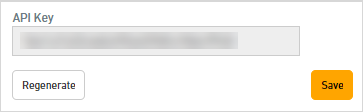
- In Starshipit, navigate to Settings > API.
- If the API Key field is blank, click Regenerate, then click Save.
- Copy the API key. You will need to enter this in BigCommerce.
3. Add your API key in BigCommerce
- Log in the BigCommerce portal.
- Select Settings, underSetup select Shipping.
- Select to Edit your shipping rules in your Checkout Shipping Options.
- Under Real-time shipping quotes, find Starshipit, and click Connect.
- Select the Connection tab.
- Paste the API key, then click Submit.
- Repeat steps 3-6 for other shipping rules.
Your courier rates will now display in your BigCommerce checkout.